Tapping the screen to turn a page means taking a hand off your instrument. How much that matters depends on what you play. Some players can spare a hand for a moment and may not need a page turner at all. Many instruments need both hands all the time. For those players, a way to turn the page without letting go of the instrument is important.
Instruments also differ in what's within reach. On some, a foot pedal is the only reliable option. On others, a small button can sit where a finger already is. I play trombone, and I turn pages with a generic Bluetooth media remote mounted on my inner slide.
Your options
Four kinds of device work. Each one connects to Windows as an ordinary Bluetooth keyboard or as media buttons, so no driver or extra app is needed on the tablet.
| Type | Current examples | Price | Good for |
|---|---|---|---|
| Foot pedal | AirTurn DUO 500, PageFlip Butterfly and Firefly, Coda STOMP | $89 to $160 | Players whose hands are never free: pianists, guitarists, drummers |
| Budget foot pedal | Donner DBM-10, M-VAVE Cube Turner, Lekato | $30 to $70 | Trying a pedal without paying for a premium one |
| Smart button | Flic 2 | About $35, or $80 for three | Sticking a single button to the stand or the instrument |
| Media remote | Generic 5-button remotes sold for car steering wheels, Satechi Media Button | $10 to $30 | Trying hands-free page turns without spending much |
| Presentation clicker | Logitech R500s, generic slide remotes | $15 to $40 | Players who already own one |
Models and prices checked in October 2026.
A few things to know before you buy:
- Pedals have modes. Most pedals can send arrow keys, Page Up and Page Down, or Space and Enter. Pick a mode that sends keys. AirTurn's AirDirect mode only works with apps built for it. I haven't tested an AirTurn myself yet.
- Up and Down arrows need a binding. Standly doesn't assign them by default. If your pedal sends them, add a binding for each (see change what a button does).
- Flic needs a phone once. Set the button to Flic Universal in the Flic phone app and assign a key to each kind of press. After that it pairs with Windows like a keyboard, with no hub. The Flic Twist doesn't support Flic Universal.
- Many clickers aren't Bluetooth. A lot of presentation clickers use a USB receiver instead. The Logitech R500s does both. It sends the arrow keys, which turn half a page in Standly unless you change the binding.
- The iRig BlueTurn doesn't support Windows. IK Multimedia makes it for iPad and iPhone.
The budget option: a Bluetooth media remote
I turn pages with a small 5-button Bluetooth remote sold for car steering wheels. It has buttons for play and pause, next and previous track, and volume up and down. It comes with a strap meant for a steering wheel.
Media remotes come in several shapes, all with the same buttons:
- Steering-wheel remotes with a strap, like mine.
- Small round buttons about the size of a Flic. These fit a Flic Grip, a mount sold on Etsy that attaches the button to an instrument.
- Clamp-on remotes that grip a bar or tube.
- Rings worn on a finger, so the button stays in your hand while you play.
Whatever the shape, get one with buttons you can feel. The first remote I bought had a completely flat face. Without looking, I couldn't tell which button I was about to press.
I mount mine on my inner slide, so I can always press it with my left hand. Other trombonists I know put a Flic on the outer slide and press it with the right hand.
I use three of the five buttons. Play and pause turns a full page, next track turns forward half a page, and previous track turns back half a page. The volume buttons are unbound.
It runs on a CR2032 coin cell. It goes to sleep after a while without a press, and the first press only wakes it. I notice this most in rehearsals, after the director has spent a while with another section.
Set it up
- Put the remote or pedal in pairing mode. The manual explains how. Usually you hold a button until a light flashes.
- In Windows, open Settings → Bluetooth & devices and select Add device, then Bluetooth.
- Select the device from the list.
- Open a piece in Standly and press a button.
Most pedals and remotes identify themselves to Windows as a keyboard or as media buttons. Standly responds to both with no setup:
- Next-track and previous-track buttons turn a full page forward and back.
- Page Down, Page Up, and Space turn a full page.
- Right and Left arrow keys turn half a page.
Play, pause, and volume buttons do nothing in Standly until you assign them, so a pedal cannot trigger something unexpected the first time it connects.
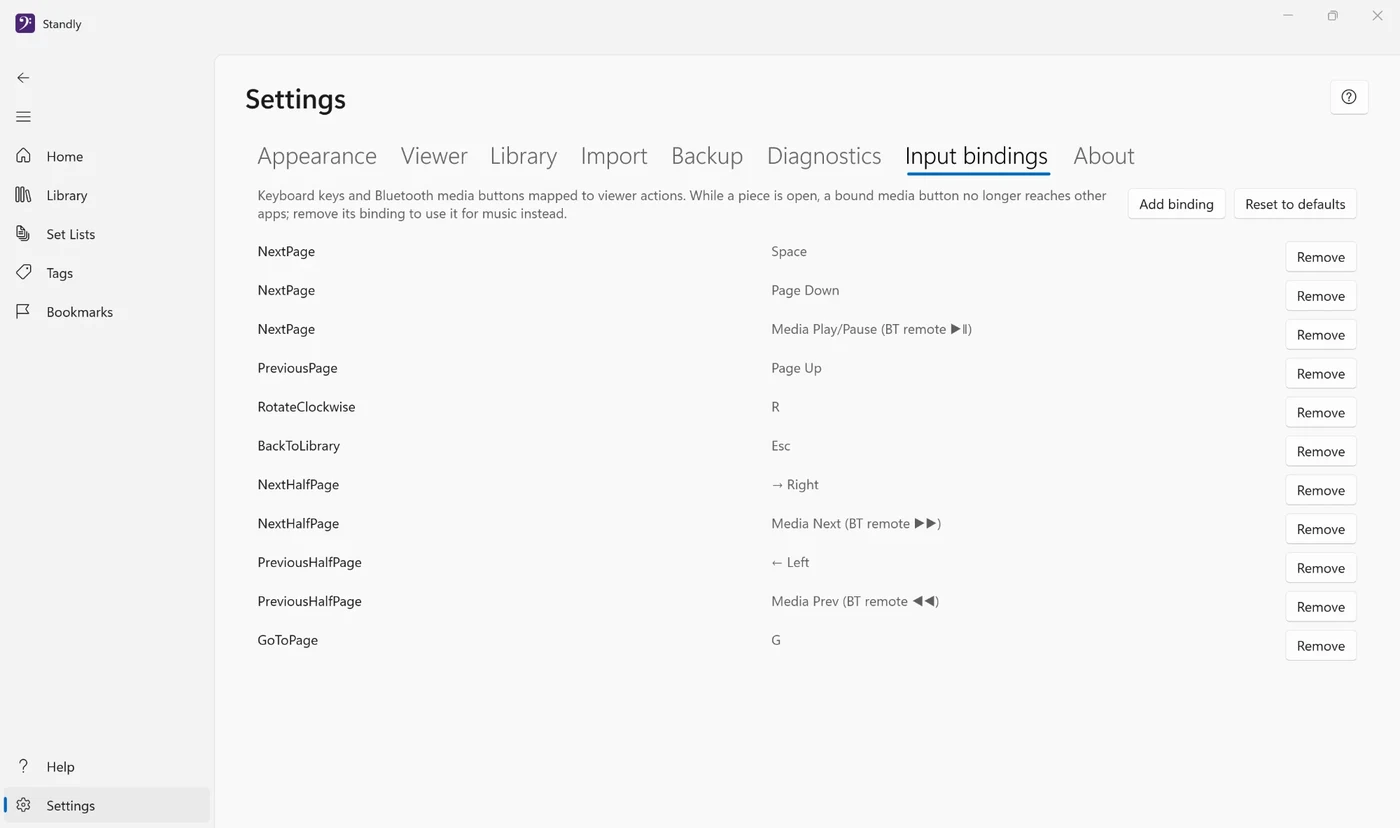
Change what a button does
Settings → Input bindings assigns any key or button to a viewer action. Changes take effect immediately.
- Select Add binding.
- Choose the action, such as NextHalfPage.
- Click the key field and press the button on your remote or pedal.
- Select Save.
Reset to defaults puts every binding back the way it was.
Some useful assignments:
- NextHalfPage, so the line you are reading stays on screen while the next line appears.
- PreviousHalfPage, for repeats, and in rehearsal when the director starts again a few bars back.
- GoToPage, for a D.S. or a coda several pages back.
Troubleshooting
It's paired, but pages don't turn
- Make sure a piece is open in Standly and the Standly window is in front. Buttons go to whichever app is active.
- Find out what the button sends. Open Settings → Input bindings, select Add binding, click the key field, and press the button. If nothing appears, Windows is not receiving it.
- Some pedals have modes that send different keys. Check the manual for a mode that sends arrow keys or Page Up and Page Down.
The volume changes when I turn a page
While a piece is open, a button bound in Standly turns the page and does nothing else. A bound volume button doesn't change the volume, and a bound next-track button doesn't skip the song in Spotify or another music player.
If the volume still changes:
- The button you pressed may not be bound. Unbound buttons still go to Windows, so an unbound volume button changes the volume. Bind it to an action, or use a different button for page turns.
- Make sure a piece is open and the Standly window is in front. In the library, or with another app in front, every button goes to Windows.
- Update Standly from the Microsoft Store. Versions released before September 30, 2026, let media buttons reach Windows even when they were bound.
To use a button for music again, remove its binding.
It stops working after a while
- Many remotes go to sleep to save battery. The first press wakes the remote, and the second press turns the page.
- Replace or charge the battery. Low batteries cause dropped presses before the device stops completely.
- If the connection drops often, remove the device in Windows Bluetooth settings and pair it again.
Which should you get?
Start with what your hands are doing while you play. If a finger can reach a spot on the instrument without letting go, a media remote or a Flic mounted there is the cheapest way to start. A $15 remote also tells you whether hands-free page turns suit you before you spend $100 on a pedal. If both hands are busy and nothing is in reach, get a foot pedal. As a trombonist, I use the remote on my slide.
If you're still choosing a tablet or 2-in-1 to read from, see choosing a Windows device.